I Tested Squarespace vs WordPress SEO. Here's What Actually Worked

TL;DR Squarespace and WordPress are both highly effective for SEO; the platform choice matters far less than your strategy, keyword targeting, and how clearly you communicate your value to Google.
I'm so tired of people saying Squarespace is bad for SEO.
Last year, I got a client to rank number one on Google for her main industry keyword. On Squarespace. She's now showing up in ChatGPT responses when people ask about her niche.
But I've also helped WordPress clients go from zero organic leads to monthly consultation requests. I've worked on both platforms for three years now. And the truth nobody wants to hear? The platform isn't usually the problem. Your strategy is.
So, which one is better? Neither; both can hit page one if you know how to use them. This blog will guide you through the real technical differences and the strategies that actually move the needle, regardless of which builder you choose.
The SEO Reputation: Squarespace vs WordPress
WordPress people love the versatility it offers for SEO. They'll tell you WordPress is the only platform serious businesses use. They'll talk about all the plugins and customization options. They're not wrong about the capabilities. But they're wrong about Squarespace being horrible for SEO.
Squarespace gets labeled as "pretty but terrible for SEO" by people who've never actually tried to optimize it properly. I've heard this from developers, from marketers, even from other SEO people. And it drives me crazy because I have clients ranking on page one and getting leads using Squarespace.
The WordPress reputation is deserved for flexibility and control. The plugin ecosystem is unmatched. RankMath, Yoast, WP Rocket. You can customize everything. You can add any functionality. If you can dream it, there's probably a plugin for it.
But here's what nobody talks about. That flexibility comes with complexity. I've taken over WordPress sites that were such a mess of conflicting plugins and bad customizations that starting over would have been easier than fixing them.
What Actually Hurts Your SEO
You know what kills SEO on both platforms? Bad design that makes people bounce immediately. Confusing navigation. Vague copy that doesn't tell Google or humans what you actually do. Slow loading speeds. No mobile optimization. Missing meta descriptions.
I've seen beautiful Squarespace sites with terrible SEO because nobody optimized anything. And I've seen ugly WordPress sites with great SEO because someone took the time to do keyword research and structure content properly.
The platform gives you tools. But tools don't matter if you don't know how to use them or if your foundation is broken.

What I've Learned Using Both Platforms
I started my SEO career working primarily on Wix and WordPress sites because that's what most of my early clients used. Then I got a Squarespace client who specifically asked if I could work on her platform. I said yes and then immediately panicked because I'd never touched Squarespace.
Turns out, it's not that complicated. Just different.
WordPress wins on customization hands down.
Want to add custom schema markup? There's a plugin.
Want to create dynamic content that changes based on user behavior? Plugin.
Want detailed control over your robots.txt file? You can do that.
The level of control is incredible if you're technical or willing to learn.
The plugin ecosystem is the biggest advantage. RankMath gives me way more SEO control than Squarespace's built-in options. I can set up advanced redirects, create custom schemas, and optimize for specific search features. Yoast might be more popular, but I prefer RankMath for the features.
Squarespace wins on simplicity and built-in structure.
Everything just works out of the box. The page speed is typically better because Squarespace controls the hosting and optimizes everything. You don't have to worry about plugin conflicts or updates breaking your site.
The templates are genuinely beautiful. My WordPress sites require either buying a premium theme or hiring a designer. My Squarespace sites look professional with minimal customization. That matters for conversion rates.
The Technical Differences That Actually Matter
WordPress requires more technical setup. You need to choose a hosting. Install WordPress. Pick and configure a theme. Install and configure plugins. Set up caching. Optimize images.
There's a learning curve even with "easy" WordPress.
People usually spend 4-6 hours just setting up a new WordPress site properly. Hosting, SSL certificate, theme installation, essential plugins, and basic optimization. That's before I even start on SEO strategy.
Squarespace, I can have a site looking good and technically sound in 2 hours. The hosting is included. SSL is automatic. Basic SEO settings are built in. You're not messing with code or plugins unless you choose to.
But here's where Squarespace people go wrong. They think that because it's simpler, SEO just happens automatically. It doesn't. You still need to structure your content correctly. You still need to do keyword research. You still need to optimize metadata and build internal links.
Squarespace gives you the tools in a cleaner interface. URL slug customization, meta title and description fields, header tag structure, alt text for images, and automatic sitemaps. It's all there. You just have to actually use it.
Squarespace SEO Wins: Client Case Studies
Let me tell you about my client, a resume writer. She came to me with a Squarespace site, but was getting maybe 10 organic visits a month.
She'd been told by multiple people that she should switch to WordPress if she wanted SEO to work. She didn't want to switch because she loved Squarespace and knew how to use it. She asked if I could make it work anyway.
I said yes. And we got her to rank number one for her main industry keyword within six months.

Here's exactly what we did.
Started with comprehensive keyword research to understand what her ideal clients were actually searching for. Not what she thought they were searching for. What Google data showed they were searching for.
Rewrote her homepage to clearly state what she does and who she helps, using those exact search terms. Before, her homepage said something vague about transformation. After, it said exactly what career challenges she helps with and who she works with.
Created a strategic blog content plan based on real questions her audience asks. Not random inspiration. Actual search queries with decent volume and achievable difficulty.
On-Page SEO
Optimized every service page with strategic keywords. Each page targeted one main keyword and several related terms. Clear H1 tags. H2 sections answering specific questions. Internal links connecting related content.
Tech SEO
Set up schema markup manually through Squarespace's code injection. Yes, you can do this on Squarespace. It's not as easy as a WordPress plugin, but it works. We added the Organization schema, Service schema, and FAQ schema to the relevant pages.
Internal linking between service pages and blog content. Built topical authority by creating helpful blog posts answering questions her clients ask before booking.
Local SEO
Optimized her Google Business Profile properly and made sure her website and GBP were saying consistent things. Location keywords throughout the content.

Leads from AI tools and Local Audience
The results? She's now ranking number top page for her primary keyword. She shows up in ChatGPT and Perplexity and got leads from them.
The same client had been in business for over four years and had gotten exactly three leads from her website. Three. In four years. She was ready to give up on having a website at all.
Three weeks after launch, she ranked number two on Google for her main service plus location. She got her first organic lead within days. Now she's getting weekly leads. She recently told me she's expanding her business because she has more clients than she can handle.
On Squarespace. With the platform that everyone said would hold her back.
WordPress SEO Wins: Client Case Study
I don't want to make this sound like Squarespace is always better. It's not. WordPress has given me incredible results, too.
I had a client who'd invested thousands in a beautiful custom WordPress site. Looked amazing. Functionally broken from an SEO perspective. She'd had the site for years and was getting basically no traffic. No rankings. Her expensive designer had focused on aesthetics and completely ignored search optimization.
When I audited her site, I found so many issues. Pages weren't indexed. No meta descriptions. Terrible URL structure. Images are slowing everything down. No schema markup. Her homepage didn't clearly explain what she did.

Website Copy Redone
We kept the design because it was actually beautiful. But I restructured everything underneath. Optimized the homepage to clearly state her niche and ideal client. Rewrote service pages with proper keyword research and clear H2 structures.
Fixed all the technical issues. Got pages indexed. Optimized images. Added proper internal linking. Set up RankMath and configured advanced SEO settings that I couldn't do on Squarespace.
Local SEO
Added local SEO optimization since she worked with clients in specific geographic areas. Set up her Google Business Profile. Created location-specific content.
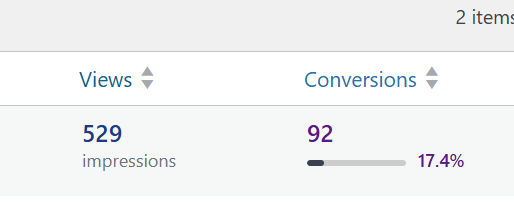
30 Downloads From Organic Search Traffic.
Within three months, she was getting rankings. Within six months, her freebie download page had over 30 downloads from organic search traffic. People were finding her through Google, reading her content, and opting into her email list.
Her investment in that beautiful WordPress site finally started paying off once we added strategy to the design.
The WordPress Advantages in Action
The WordPress plugin ecosystem made this transformation faster. RankMath gave me detailed control over every page's SEO settings. I could create advanced schemas without touching code. I could set up redirects instantly when we changed URL structures.
I used WP Rocket for caching and speed optimization. Smush for image compression. Pretty Links for tracking which external links were getting clicks.
The level of detail and control was incredible.
I could also see exactly what was and wasn't working through the built-in analytics from RankMath.
Which keywords were gaining traction?
Which pages need improvement?
What technical issues cropped up?
If this client had been on Squarespace, could we have gotten similar results? Probably. But it would have taken longer and required more manual work.
WordPress plugins automated things that I'd have to do manually or with custom code on Squarespace.
What Matters More Than the Platform
After working on dozens of sites across both platforms, I can tell you the platform choice matters way less than people think.
What actually drives results is a strategic SEO setup.
Did you do keyword research or just guess?
Are your headings structured properly?
Do your meta tags clearly describe what the page is about?
Is your content answering real questions people are searching for?
Clear copy matters more than anything. I've seen perfectly optimized sites with terrible copy get zero conversions. Your website needs to be clear about what you do, who you help, and what action visitors should take. If people land on your site and don't understand what you're offering, all the SEO in the world won't help.
Local Visibility Changes Everything

For service-based businesses, local SEO is often more impactful than anything else. Your Google Business Profile matters more than your website platform. Location keywords in your content. Reviews and ratings. Consistent NAP information across the web.
I've had clients get leads from their Google Business Profile before their website even started ranking. Someone searches "SEO consultant in Montclair," finds their GBP, clicks through to the website, and books a call. That entire journey started with local SEO, not the website platform.
Internal linking and schema markup make huge differences on both platforms. A well-structured website with clear topic clusters and internal links will outperform a randomly organized site every time.
Schema tells search engines exactly what your content is about. I add schema to every client site regardless of platform. FAQ schema, Service schema, Organization schema, LocalBusiness schema. These help you show up in rich results and give search engines clear signals.
Blogging With Purpose
Both platforms support blogging. What matters is whether you're blogging strategically or just creating content for the sake of content.
Every blog post should target a specific keyword.
Every post should answer a real question your audience is asking.
Every post should include internal links to related content and clear calls to action.
I see so many businesses blogging about whatever they feel inspired to write about. That's fine for personal expression. It's terrible for SEO. Your blog should be a strategic tool for attracting your ideal clients through search, not a journal.
On WordPress, you have more plugin options for optimizing blog posts. On Squarespace, you have cleaner, simpler tools, but still everything you need. The platform doesn't determine if your blog succeeds. Your strategy does.
Which One Should You Use?
Pick WordPress if you want full control and plan to scale significantly. If you're technical or willing to hire technical help. If you want maximum flexibility and don't mind the complexity. If you need specific functionality that requires custom plugins.
WordPress makes sense for content-heavy sites, membership sites, e-commerce with lots of products, or businesses that need custom functionality. The plugin ecosystem gives you almost unlimited possibilities.
Pick Squarespace if you want to launch quickly with a beautiful design and you're working with someone who knows how to optimize it for SEO. If you value simplicity over maximum control. If you don't want to deal with hosting, security updates, and plugin management.
Squarespace makes sense for coaches, consultants, service providers, and small businesses that need a professional web presence without technical headaches. The built-in features are enough for most businesses if you use them strategically.
Either Way, Strategy Beats Platform
I've gotten incredible results on both platforms. I've also seen sites fail on both platforms when a strategy was missing.
The best platform is the one you'll actually maintain and optimize. If WordPress feels overwhelming and you never touch it, Squarespace is better for you. If Squarespace feels limiting and you want more control, WordPress is better.
Just don't blame the platform when SEO isn't working. Nine times out of ten, it's not the platform. It's the strategy, the content, or the technical setup.
FAQs: Squarespace vs WordPress SEO
Which is better for beginners?
Squarespace is way easier to manage without technical knowledge. You can have a professional site up and optimized in a day. WordPress has a steeper learning curve and more ongoing maintenance. If you're not technical and don't want to hire tech help, Squarespace is the better choice. You can always migrate to WordPress later if you outgrow it.
What if I already have a site, but it's not ranking?
You probably need an SEO audit to identify the actual problems. Most ranking issues come from unclear copy, poor site structure, missing optimization, or technical problems. Not the platform itself. I've fixed non-ranking sites on both Squarespace and WordPress. Usually, it's fixable without switching platforms.
Should I switch from Squarespace to WordPress for better SEO?
Not unless you've maxed out what Squarespace can do and need specific advanced features. Switching platforms is expensive, time-consuming, and risky. You could lose rankings during migration. I'd only recommend switching if you need custom functionality that Squarespace can't provide, not for SEO alone.
About the Author & SEO Consultant
Sonia Urquilla is an SEO consultant who helps service providers get found without chasing clients online. She works with female coaches, consultants, and local service-based businesses that are tired of relying on referrals and social media alone.
Her work focuses on bridging the gap between how people search and how service providers talk about their work, helping websites turn visibility into leads. You can learn more about her approach here or schedule a strategy call.
It's Not the Platform. It's the Strategy.
Both Squarespace and WordPress can deliver real SEO results. I've proven that with actual clients ranking on page one, getting organic leads, and showing up in AI search results on both platforms.
What matters is clear messaging, strategic keyword targeting, proper site structure, and consistent optimization. Those fundamentals work everywhere.
If you're still unsure which platform is right for you or why your current site isn't ranking, let's do an audit. I'll tell you exactly what's broken and how to fix it, regardless of which platform you're on.
Key Takeaways
Strategy > Platform: A smart strategy on a "simple" site will always beat a bad strategy on a complex one.
Choose Consistency: Pick the platform you will actually update; an abandoned site never ranks.
Prioritize Schema: Use Product, HowTo, and VideoObject schema to claim more space on page one.
Local SEO Wins: For service businesses, your Google Business Profile often drives more leads than your platform.
Avoid Unnecessary Migrations: Don't switch platforms for "better SEO" Most ranking issues are fixable where you are.
How We Can Work Together:
Get a Free 10-Minute SEO Audit: Stop wondering why you aren't ranking. I’ll show you exactly what’s holding you back.
Done for you SEO services: Specialized strategy to turn your expertise into organic traffic.
SEO Copywriting Services: Let me handle the research and content plan for you with high-converting, optimized copy.
Book a Strategy Call: Let’s map out your specific 12-month plan together.
Your ideal clients are searching for solutions right now. Make sure they find you.


Comments